'%20clip-path='url(%23canvas-clip)'/%3e%3cg%20clip-path='url(%23canvas-clip)'%3e%3cg%20transform='rotate(0,%20256,%20256)'%3e%3cg%20transform='translate(87%2087)%20scale(14.083333333333334%2014.083333333333334)%20translate(0%200)'%3e%3cpath%20fill='none'%20stroke='%23FFFFFF'%20stroke-linecap='round'%20stroke-linejoin='round'%20stroke-width='2'%20d='m18.064%2010.877l-4.89-7.26c-.42-.625-1.287-.803-1.936-.397a1.4%201.4%200%200%200-.41.397l-4.893%207.26C4.24%2013.715%204.9%2017.318%207.502%2019.423a7.13%207.13%200%200%200%204.168%201.572M15%2018a3%203%200%201%200%206%200a3%203%200%201%200-6%200m5.2%202.2L22%2022'/%3e%3c/g%3e%3c/g%3e%3c/g%3e%3c/svg%3e)
Ecommerce Search Filters: A Complete Guide to Facets, Values, and Collection UX
Filters are a promise about what the shopper can safely narrow. A useful ecommerce filter is not a list of product fields. It is a small decision system. It tells a shopper which distinctions the catalogue can support, applies those distinctions to the right product or variant, and preserves the result as the shopper continues.
The hard part is not drawing checkboxes. The hard part is keeping source data, eligibility, counts, boolean logic, presentation, URLs, mobile behaviour, and product handoff in agreement. When one layer disagrees, the filter feels broken even when it technically responds.
This guide gives you a way to tell the difference between a filter that merely changes the grid and one that supports a defensible choice. You will follow a constrained request from field coverage to count, control, variant, mobile state, and cart so each setting has a reason behind it.
The shopper asks
“Can I narrow this safely?”
The catalogue must answer
“Which records satisfy the constraint?”
The interface must prove
“The result, count, and next action agree.”
Chapter 1 · Understand the contract
A filter has six layers, and each layer can fail independently
Start with the contract rather than a theme setting. A filter can be configured correctly and still be absent because the current template does not render it. It can render correctly and still be useless because the source values are incomplete. These are different repairs. Find the first layer that breaks the expected promise; changing a later layer can make the symptom look better while leaving the cause untouched.
Source
A product, variant, category, or market record owns a typed value.
Failure: The value is missing, duplicated, stale, or stored in a field the filter cannot use.
Eligibility
The value belongs to the current query, collection, market, and publication state.
Failure: A value appears because it exists somewhere in the catalogue, even though no current result can satisfy it.
Aggregation
The response returns values, counts, selected state, and stable identities for the same result set.
Failure: Counts describe the base collection while products reflect a narrower selection.
Selection
Within-facet and across-facet AND/OR semantics are deliberate and visible.
Failure: The interface allows several choices but the engine applies a different boolean rule.
Presentation
The label, control, order, empty state, and applied summary explain what changed.
Failure: A tap changes a checkbox but not the result, URL, or product-card evidence.
Continuation
The selected state survives refresh, Back, sharing, and a mobile filter drawer.
Failure: The shopper loses the work they just did when they open one product or return to the list.
Step · Read a filter as a promise
“Black waterproof jacket under £200” is a six-part result contract
A shopper does not experience this request as six database predicates. They experience one promise: the remaining products should be jackets, black, waterproof according to a defensible field, under the stated budget, and available in the relevant context. If the result count says four but one card is a lamp, one is £240, and one is sold out, the filter has failed even if every checkbox responded.
Work through the request from source to handoff. Confirm the category and attribute fields, decide whether price is variant-level, define whether sold-out products count, and keep the currency visible. Then open one result and verify that the matching colour, size, price, stock, URL, and cart line still refer to the same variant. That final step catches the parent-product mistake that a filter count can hide.
Once the contract is explicit, the interface choice becomes easier. Use a swatch for a stable colour choice, a range for a meaningful numeric field, a searchable list for many legitimate values, and a collection profile when the decision belongs only to one assortment. The control follows the promise.
Shared worked example: Northline Supply sells outdoor workwear and electrical parts in one 6,200-product catalogue. In this foundations guide, the buyer starts with “black, waterproof jacket under £200”; the later cluster pages reuse the same store for facet state, collection-specific groups, long connector values, missing-filter diagnosis, and the 5,000-product collection boundary. The figures are illustrative fixtures, not Northline Supply or ParticleSearch measurements.
Source proof
The matching field and variant values exist, are current, and have the right meaning.
Result proof
Counts, selected values, cards, and availability agree after the query is applied.
Handoff proof
The product page and cart preserve the same sellable choice the filter presented.
Native Shopify boundary: Shopify’s current Search & Discovery documentation, checked August 23, 2026, says native filters are unavailable on collections with more than 5,000 products or searches with more than 100,000 results; it also documents a maximum of 25 configured filters and 100 storefront values per filter. A group can contain up to 200 unique values and a store can have up to 1,000 groups. Those are platform conditions, not universal UX thresholds. Confirm the exact surface and provider before applying them.
Source: Shopify Search & Discovery filter documentation, checked August 23, 2026.
Chapter 2 · Choose fields by decision
Expose the distinctions that change a purchase, not every field in the feed
Start with the questions buyers ask when an assortment is difficult to compare. A filter deserves space when it reduces a real decision cost. A field should stay out of the storefront when it is internal, sparse, unstable, or impossible to interpret without expert context.
Use the same field for the same job. Product type should not mean one thing in a collection and another thing in search. If an important assortment needs a different vocabulary, make that a deliberate collection-specific profile rather than quietly changing the global meaning. See the filter-groups guide for the baseline, profile, and override decision.
| Field | Decision question | Good use | Risk to resolve |
|---|---|---|---|
| Product type or category | What kind of thing is this? | Guide a broad browse task and establish a useful starting set. | Duplicated responsibilities across tags, types, and collections create contradictory paths. |
| Brand, maker, or supplier | Who made it or who do I trust? | Separate otherwise similar products when brand is a genuine buying criterion. | Internal vendor names leak into a customer-facing choice. |
| Material, use, or specification | Does it meet my requirement? | Turn product evidence into a decision constraint such as material, rating, or compatibility. | A display value is present on a product page but is missing, inconsistent, or untyped in the catalogue. |
| Variant option | Which purchasable choice do I need? | Narrow size, colour, voltage, connector, pack, or finish without losing the matching variant. | Different variants satisfy separate selections, so the product looks valid but the sellable choice is not. |
| Price or numeric capacity | What fits my budget or physical constraint? | Let a shopper express a bounded numeric requirement. | Text values, mixed units, currency confusion, or variant ranges make the result and count disagree. |
| Availability and fulfilment | Can I get it in my context? | Respect stock, publication, market, and delivery constraints when they are part of the purchase. | A product is shown as available because one hidden or ineligible variant is available. |
Chapter 3 · Make counts honest
A count is useful only when the shopper knows what it counts
Counts are not decoration. They set expectations about the next click. Decide whether counts represent the exact current state, alternative values within the current facet, or the unfiltered reference set. Keep the model stable enough that a shopper can learn it.
Exact current-state counts
Counts include every active selection, so they describe the result set the shopper would see now.
Useful when: Precise for a constrained query.
Trade-off: Sibling values can collapse to zero and make exploration feel closed.
Alternative-value counts
Counts keep the current facet open while applying other facets, showing viable alternatives inside that decision.
Useful when: Useful for comparison and discovery.
Trade-off: The count needs a clear label because it is not the same as the current result total.
Reference counts
Counts describe the unfiltered category or query baseline.
Useful when: Helpful as an overview of catalogue distribution.
Trade-off: A value can look promising and disappear after another selection.
Never promise a count the result cannot honour. If a value has a count but no eligible product after the next selection, either the count model or the eligibility rule needs to be explained and tested.
Example
“Black waterproof jacket under £200”
The result must satisfy product type, colour, waterproof evidence, price, currency, and an eligible sellable state. Matching “black” in a long description is not enough.
What can fail
The count and card disagree
A facet may say four products match while the grid includes a sold-out variant or a jacket above the budget. The shopper experiences that as a broken filter, even if every click technically worked.
The proof
Check the matching variant
Open at least one result and confirm the colour, size, price, stock, product URL, and cart line all refer to the same eligible choice. A product-level pass can hide a variant-level failure.
Chapter 4 · Choose the right control
The control should match the shape of the value and the speed of the decision
| Control | Choose it when | Avoid it when |
|---|---|---|
| Checkbox list | The values are categorical and shoppers may choose several. | Hundreds of values with no within-list search or grouping. |
| Swatch | Colour or another visual option carries meaning and maps reliably to a variant. | A decorative swatch that hides ambiguous names or missing variant data. |
| Range | The field is numeric, normalised, and naturally understood as a boundary. | Ratings, sizes, or currencies that have not been converted to one meaningful unit. |
| Search within values | The facet has too many legitimate values to scan comfortably. | Using a filter-value search to compensate for duplicated or uncontrolled source values. |
| Grouped values | Several source values mean the same shopper-facing choice. | Merging values that have different compatibility, performance, or fulfilment implications. |
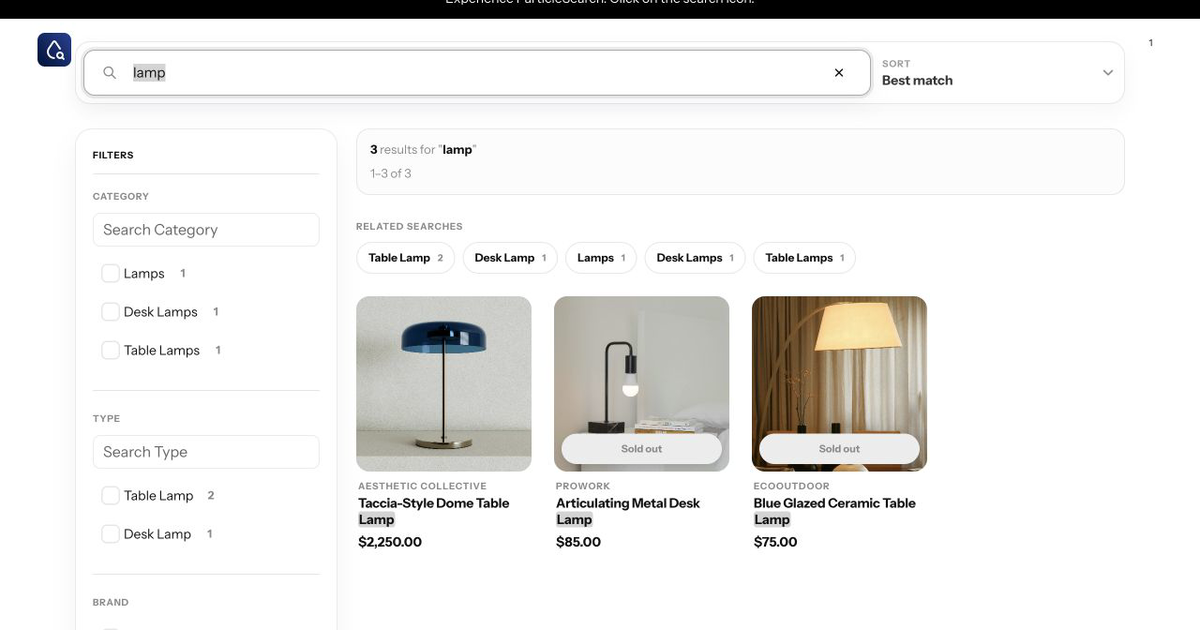
On mobile
Use a drawer or sheet with an applied count, a clear action, and a visible Apply path when changes are staged. Keep the query, selected values, and result summary visible when the control closes. Do not make a shopper rebuild a long filter path after opening one product.
On every surface
The selected value should be removable, the result should visibly change, and refresh or Back should preserve the intended state. Accessibility is part of the filter contract, not a separate polish pass.
Chapter 5 · Protect variant meaning
A product can pass a filter and still be the wrong sellable item
Variant-aware filtering is where many plausible implementations fail. A product-level result is not enough when colour, size, connector, voltage, pack, price, or stock belongs to the variant. Declare the scope of each field and keep the matching variant attached to the card, product link, and cart action.
Colour + size
Rule: Both values must exist on one eligible variant when the shopper is choosing a sellable combination.
Wrong result: A red large variant and a blue medium variant make the product pass.
Product field + variant field
Rule: A product-level material can combine with a variant-level voltage, but each field keeps its own scope.
Wrong result: A variant option is treated as if it applies to every variant.
Price + stock
Rule: The price and availability shown after filtering must refer to an eligible purchasable state.
Wrong result: A low price from an unavailable variant makes an in-stock product look affordable.
Exact identifier + filters
Rule: An identifier query should preserve identity even if a broad filter or discovery rule is also active.
Wrong result: Fuzzy discovery broadens a known part number into unrelated products.
For the full identity path, see the ecommerce variant search guide. For the platform-specific missing-filter diagnosis, use Shopify filters not showing.
Chapter 6 · Govern change
A filter is a living catalogue decision, not a one-off theme task
New products add values. Suppliers change names. Categories split. Markets lose stock. A filter system that looks right on launch day can become noisy or misleading after the next catalogue import.
Give each important filter an owner and a reason. Review coverage, duplicate values, empty paths, high-use combinations, and changes in the shopper vocabulary. If the filter is important enough to influence a purchase, protect it with representative queries and a before-and-after acceptance record.
Coverage
Do eligible records have a usable value?
Meaning
Do equivalent values share one identity?
Behaviour
Do selection, counts, URL, and handoff agree?
Freshness
Does the state change when stock and catalogue change?
Interlude · Design collection UX
A collection page should expose one buying task, not the catalogue schema
A collection page already gives the shopper a bounded assortment. Its title, introduction, result count, filter labels, and product evidence should describe that same assortment. Keep shared fields such as brand or availability when they help across the store; add collection- specific fields only when they shorten a real comparison task. If no shared constraint makes the products a coherent group, split the collection before adding more controls.
Treat the selected URL as shopper state by default, not as an automatic SEO landing page. A stable combination can earn its own maintained destination when it has a durable buyer need, unique explanation, an owner, and deliberate internal links. A changing size, stock, or price combination can remain useful and shareable without becoming a separate search destination. Use the faceted-navigation guide for the crawl, index, canonical, sitemap, and response policy that follows from that choice.
Collection acceptance check
- Confirm the page promise, filter vocabulary, and returned products describe one assortment.
- Apply one known match and one known exclusion; verify the count model and matching variant.
- Refresh, share, use Back, and return from a product without losing the selected task.
- Record whether the URL is a maintained landing page or shopper-only state, then assign its crawl and index policy.
Where ParticleSearch fits
ParticleSearch turns filter maintenance into a managed decision instead of repeated theme work
ParticleSearch is a fit when your storefront needs filters, filter-value search, mobile drawers, and global or collection-specific groups to stay connected to the same result state. The storefront search capability page describes those surfaces; the exact fields and groups still depend on your catalogue and configuration.
The useful outcome is not “more filters”. It is a narrower, more trustworthy decision path: fields and value groups earn storefront space, long value lists remain usable, and the result surface keeps the selected state, products, and next action connected.
ParticleSearch does not invent a missing catalogue attribute or make a bad source value correct. It gives the merchant a place to see the gap, make a deliberate override, and verify the storefront consequence without rebuilding the same configuration by hand for every collection.
Step · Diagnose the layer that failed
The visible symptom rarely tells you which filter layer is broken
A missing control can mean the field was never sourced, the values were not indexed, no eligible result currently carries the value, or the interface decided not to render the control. A wrong count can come from product-level counting over variant-level evidence. A correct result card can still open the wrong option. Treating all three as “filter UX” sends the repair to the wrong owner.
Trace one known item and one near-neighbour through the six-layer contract. Confirm the source value and owner, the indexed representation, the eligibility context, the count unit, the selected result, and the downstream variant. Change the first layer that breaks the expectation. Do not compensate for an indexing omission with a label, or for a variant handoff problem with a ranking rule.
The negative case is often more informative than the positive one. If a black jacket correctly appears for black but a navy jacket also appears, inspect value identity and variant scope. If the navy jacket disappears correctly but the count is too high, inspect aggregation. If the count and cards agree but the product page resets to another colour, the filter worked and the handoff failed.
Symptom: the filter is absent
Check source coverage, indexed fields, current eligibility, collection profile, then rendering. Do not begin by adding CSS or a duplicate control.
Symptom: the shortlist is dishonest
Check value equivalence, product-versus-variant scope, market and stock eligibility, then card and destination identity.
Chapter 7 · Run the acceptance test
Use one real shopper job to prove the complete path
Do not finish when the control appears. Finish when a shopper can express the constraint, understand the result, continue, and recover without losing their work.
- 1
Write the shopper decision in one sentence. “Find black, waterproof jackets under £200” is a job; “show every field” is not.
- 2
Name the source and scope for each constraint: product, variant, category, market, price, stock, or content.
- 3
Pick a representative control query, one known match, one known exclusion, and one boundary case such as a mixed-variant product.
- 4
Check value coverage and normalisation before changing labels. A missing or duplicated value is a data problem, not a layout problem.
- 5
Apply the filter and verify products, counts, selected state, URL, refresh, Back, and the product-page or cart handoff.
- 6
Record the decision, owner, evidence, and review date. Revisit a filter when the catalogue, market, theme, or shopper vocabulary changes.
Good filters make the catalogue easier to reason about. Choose fields by shopper decisions, keep their scope and counts honest, preserve variant identity, and operate the system as the catalogue changes. That is the difference between a filter panel and a useful discovery tool.
Continue with faceted navigation for URL and SEO implications, or use search analytics to find filter paths that repeatedly create thin or empty results.