'%20clip-path='url(%23canvas-clip)'/%3e%3cg%20clip-path='url(%23canvas-clip)'%3e%3cg%20transform='rotate(0,%20256,%20256)'%3e%3cg%20transform='translate(87%2087)%20scale(14.083333333333334%2014.083333333333334)%20translate(0%200)'%3e%3cpath%20fill='none'%20stroke='%23FFFFFF'%20stroke-linecap='round'%20stroke-linejoin='round'%20stroke-width='2'%20d='m18.064%2010.877l-4.89-7.26c-.42-.625-1.287-.803-1.936-.397a1.4%201.4%200%200%200-.41.397l-4.893%207.26C4.24%2013.715%204.9%2017.318%207.502%2019.423a7.13%207.13%200%200%200%204.168%201.572M15%2018a3%203%200%201%200%206%200a3%203%200%201%200-6%200m5.2%202.2L22%2022'/%3e%3c/g%3e%3c/g%3e%3c/g%3e%3c/svg%3e)
Catalogue data
The product is not eligible
If the source catalogue is missing a product, field, SKU, or available variant, search cannot retrieve evidence that is not there.
ParticleSearch connects your Shopify catalog to the words customers actually use: SKUs, part numbers, sizes, colors, product types, and plain English. Merchants can review what was searched, what was found, and what needs attention before publishing a change.
Eligible 30-day free trial · Shopify confirms billing and trial eligibility · Plans start at $79/month
Illustrative shopper surface
Find “blue glazed table lamp”
Refine
Type · Table lamp
Colour · Blue
Stock · Available
Blue ceramic lamp
Variant cues · Quick add
Glazed table lamp
Match evidence · Price
Illustrative merchant workspace
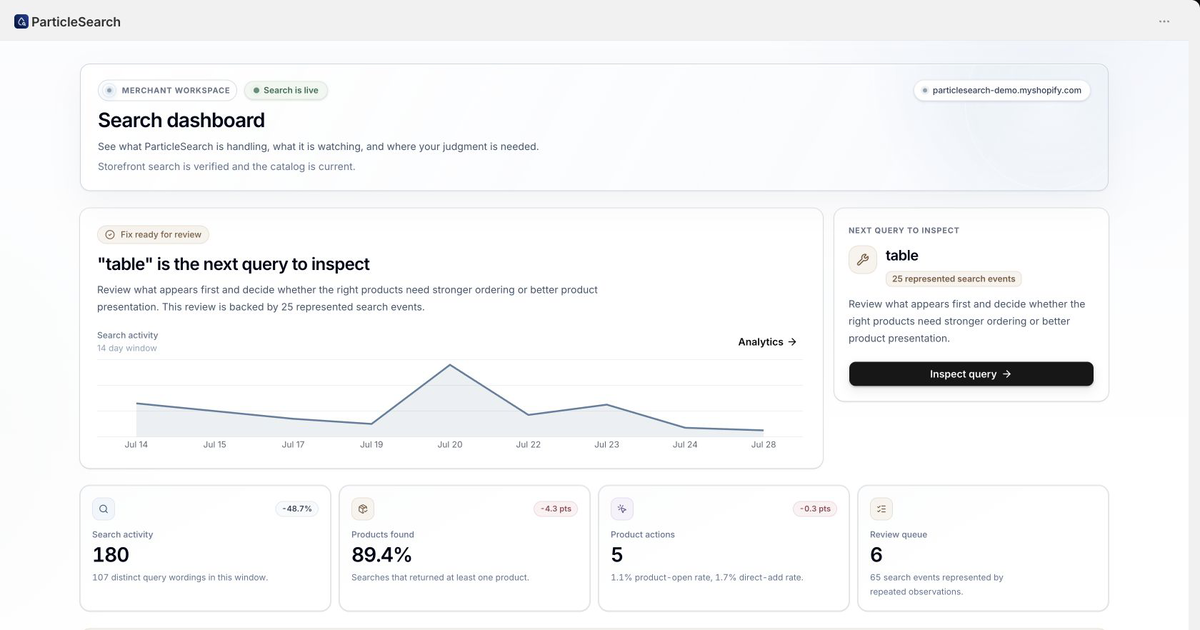
“table” is the next query to inspect
Review evidence, compare a draft, then publish.
Source data → result candidates
Result → product or variant action
Evidence → merchant change
Why search needs a system
A shopper experiences one moment, “help me find the right product,” but several systems decide whether that moment succeeds. The useful repair depends on where the path breaks.
ParticleSearch gives those boundaries different homes so a merchant can repair the source catalogue, search behavior, refinement, or storefront handoff without treating every failure as a ranking problem.
If the source catalogue is missing a product, field, SKU, or available variant, search cannot retrieve evidence that is not there.
If a valid product is absent from the candidate set, changing its position later will not fix the query. The retrieval path needs attention first.
A shopper may see relevant products but still be unable to choose by type, colour, size, availability, or another useful catalogue value.
A result is not finished when it is clicked. The product page, selected variant, price, availability, and next action must remain coherent.
The merchant outcome
ParticleSearch helps turn the demand already reaching your store into clearer paths to a product, a conversion, and the next useful discovery. Your team also gets the evidence and actions to improve that path. It is a system for making the opportunity visible, not a guarantee of incremental revenue.
Review search-processing time separately from network and browser work, while incremental product and inventory updates keep the search index aligned with the store.
Help shoppers move from a phrase or identifier to a relevant product, variant, and eligible next action. On Scale, review orders linked to search activity as observed shopper paths.
See the product, variant, availability, and query evidence behind a result so missing or incorrect source facts can be repaired where they belong.
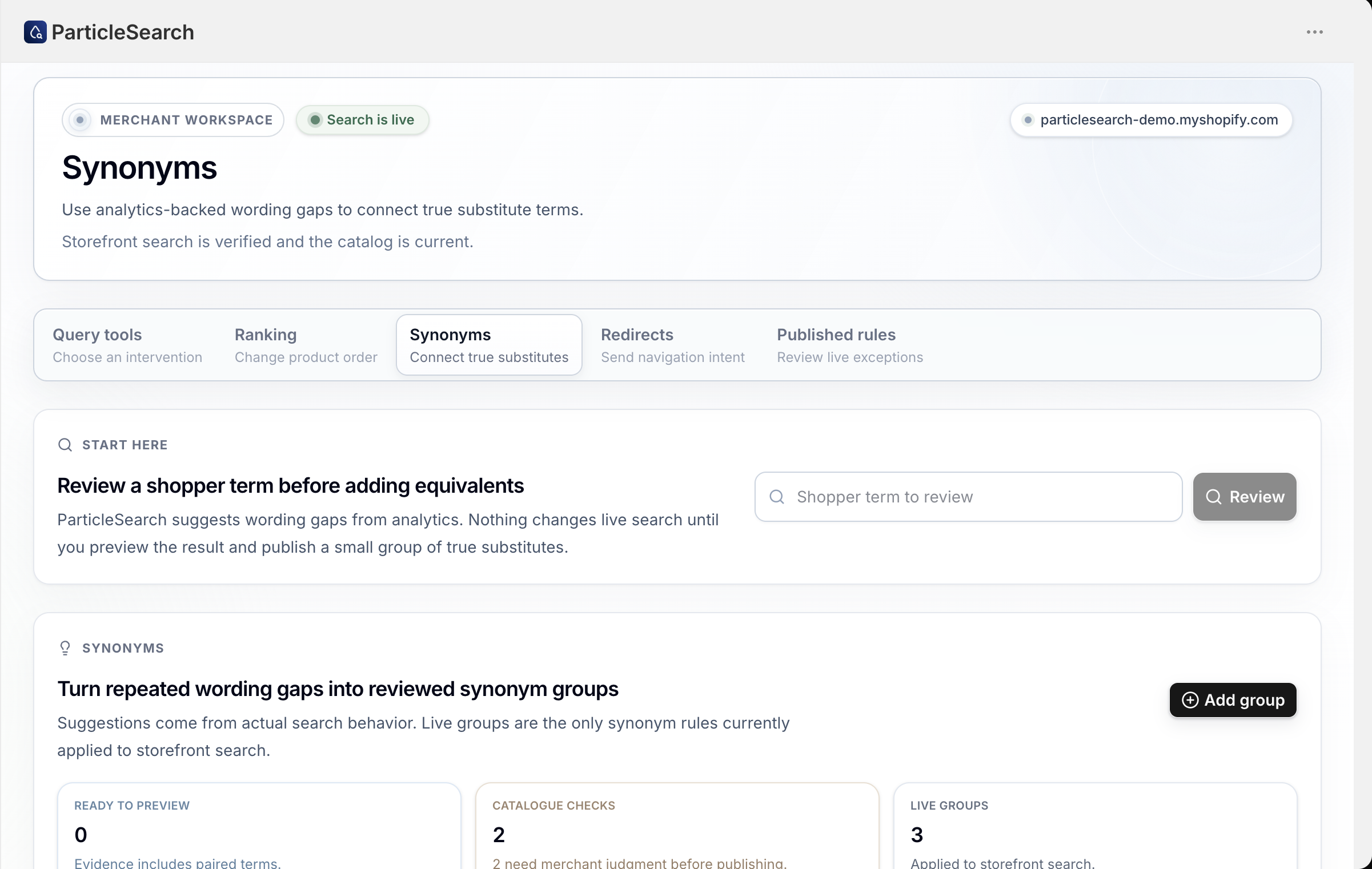
Convert a repeatable search problem into the right bounded intervention, such as a synonym, redirect, ranking, or merchandising change, then compare and publish it with a record.
The two operating surfaces
The storefront helps a shopper move from a question to a product action. The merchant workspace explains what happened and gives the team a bounded way to improve it.
Available after setup
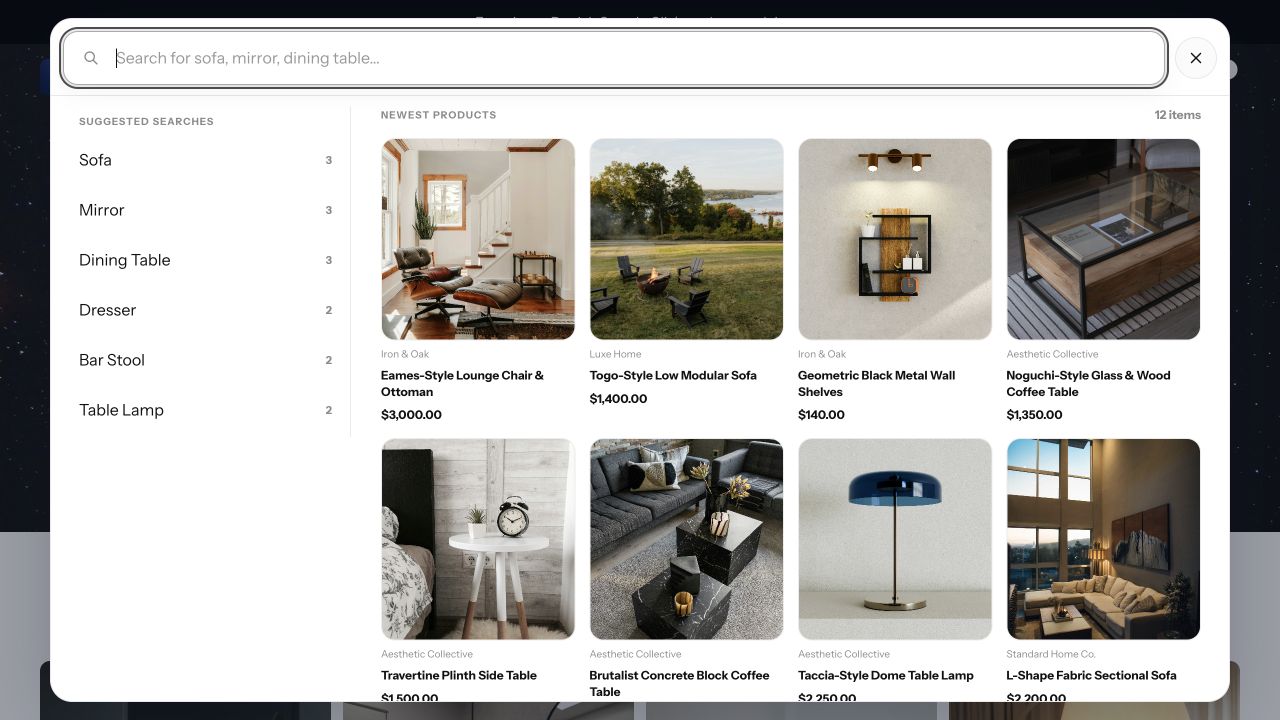
Help shoppers start with suggestions and recent intent, move into relevant product results, refine with filters, and reach the right product or variant without losing their context. Modal and full-page search use the same catalogue truth.
Optional merchant controls
Review search activity, catalogue coverage, storefront health, and product actions before choosing the smallest change that can address a specific query problem. These controls are for teams that need to tune, compare, and govern search deliberately.
Storefront capability
Known-item lookup, broad discovery, collection refinement, and product comparison need different controls, with one consistent catalogue and storefront contract.
Search exact identifiers and option evidence when those values are present and eligible in the Shopify catalogue.
Use a compact search modal for fast lookup and a full results page when shoppers need room to compare and refine.
Show live counts, search within long filter values, preserve active state, and move refinement into a mobile drawer.
Keep price, sale state, availability, option cues, product details, and eligible quick-add actions close to shopper intent.
Support typo correction, related searches, content results, and recommendation placements without presenting every suggestion as a match.
Opt selected collection routes into scoped search, filters, sorting, and pagination without silently escaping the collection.
Merchant control loop
ParticleSearch keeps the evidence, intervention, draft comparison, published rule, and later outcome in one operating path.
Step 01
Move from shopper-search trends, zero-result patterns, product actions, and repeated evidence to one concrete query.
Step 02
Use a synonym for a true substitute, a redirect for navigation, ranking for order, or merchandising for a bounded campaign.
Step 03
Run the proposed change against the same search path the storefront uses instead of trusting a local approximation.
Step 04
Confirm what is active, then keep important product queries in a small repeatable test set so future changes do not quietly undo the result.
Product and infrastructure proof
ParticleSearch keeps search processing separate from network delivery and browser rendering. That distinction helps merchants identify whether a slow or broken experience belongs to search, the storefront, or the handoff between them.
Search processing
measured as its own layer
Separate search processing from network delivery, theme scripts, browser work, and rendering when diagnosing a storefront experience.
Live, draft, compare
merchant query workflow
Verify a focused change against the same storefront search path before publishing it.
Source → storefront
catalogue handoff
Keep the path from Shopify product and inventory changes to searchable storefront evidence reviewable.
Native Shopify search is a sensible starting point. ParticleSearch becomes worth testing when important queries repeatedly fail, shoppers need identifiers or variant evidence, or the team needs a clear path from search evidence to a controlled change. Start the eligible trial, connect the catalogue, and run the queries your shoppers actually use.
What stays with your team
Before you install
ParticleSearch is delivered through a Shopify theme app embed. After billing and catalogue preparation, the merchant enables the embed, verifies the storefront runtime, and chooses the supported search, collection, content, product-card, and recommendation settings that fit the store.
Yes, when the SKU, barcode, option, model, or other identifier exists in an eligible Shopify product or variant record. The storefront can show the evidence and preserve an identifiable variant handoff; search cannot invent a value missing from the source catalogue.
No search app can guarantee the same end-to-end time for every storefront. Search processing, network delivery, CDN behaviour, browser work, theme scripts, images, and rendering are separate layers. ParticleSearch helps you inspect those boundaries instead of treating one timing number as the whole experience.
Run exact identifiers, common product phrases, a known typo, the largest collection, mobile filters, product and variant handoff, and one query your current search gets wrong. Then inspect the dashboard evidence, preview one bounded repair, and verify the published storefront.
Stay native when your important queries, predictive and full-page surfaces, largest collections, mobile filters, and reporting needs already pass. ParticleSearch is useful when the storefront gap is repeatable and the team needs a dedicated operating surface to investigate and change it.
Test the shopper result, the product or variant handoff, the dashboard evidence, and one merchant change before deciding whether ParticleSearch fits.